Feature: Prompt Library

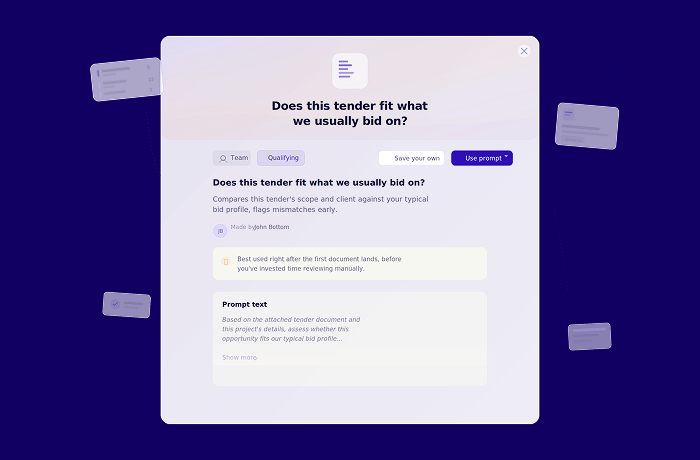
The Prompt Library: know what to ask at every stage of your bid.
The Bid Companion can search your Knowledge Library, check your fit against a tender, draft answers from your own data, and prepare your meetings. But only if you know what to ask.
That is the gap most teams hit. The capability is there. The starting point is not. A bid manager who has used the tool for months knows exactly how to phrase a gap analysis or extract award criteria. The SME joining for one section, the new team member, or the colleague on their first tender? They open the Bid Companion and are not sure where to begin.
The Prompt Library closes that gap. It gives your whole team a shared set of proven prompts, organised by the work they are doing right now. And when someone finds a prompt that works, they can save it, share it, and turn it into a repeatable standard.
43 tested prompts across the full bid lifecycle.
The core Prompt Library consists of 43 tested and approved prompts. They span the entire process, from understanding the tender to reviewing your draft, organised into eight categories named after the job they serve:
- Understand the tender. Summarise the scope, extract award criteria, map the timeline, list required documents.
- Find our evidence. Search your Knowledge Library for case studies, certifications, policies, and positioning.
- Check our fit. Run hard-gate checks, spot dealbreakers, map gaps before you commit.
- Write your answer. Draft responses, explore bold alternatives, brainstorm ideas for a criterion.
- Strengthen your answer. Score a draft against the buyer's criteria, get feedback on clarity and completeness.
- Polish the wording. Rewrite for conciseness, adjust tone, simplify for non-expert readers.
- Track the work. View active bids, count open requirements, check workload by assignee.
- Prep your meetings. Build go/no-go briefs, risk review plans, and stand-up summaries.
Every prompt is tagged by phase (Qualifying, Active bid, or Submission) so you can filter to where you are in the process and see only what is relevant.
.png)
Your team's best prompts, saved and shared.
The 43 built-in prompts are the starting point. Now you can add your own.
Always asking the same questions of a tender? Need niche information that is specific to your industry? Already using customised prompts in another system? Add them in Altura and they become a consistent, reusable format for your whole team.
Anyone can create a prompt and save it to their personal library. When it proves its value, propose it for the organisation: a Global Manager or Admin reviews and approves it, and it becomes available to everyone. Rejected proposals come back with written feedback so you can adjust and resubmit. You can also save a copy of any existing Altura prompt, adapt it to how your team works, and share that instead.
The result is a living playbook that grows with every bid. The prompts that produce reliable, on-tone output stop being locked in one person's head and start being available to the next colleague who needs them.
.png)
One rule: you always stay in control.
One rule runs through the entire Prompt Library: clicking a prompt fills the composer. It never sends automatically.
This matters. A prompt might need a project name filled in, a table reference updated, or the scope narrowed to one section. The Prompt Library gives you the starting point. You review, edit, and send when you are ready.
This is a deliberate choice. You are not correcting auto-generated output after the fact. You are shaping the instruction before it runs, grounded in your own data and your own judgement. The result is more predictable, more relevant, and more yours.
.png)
How it works.
Find a prompt. Type / for a quick filtered list, or open the full library to browse by category, phase, or source. Every prompt shows where it comes from: Altura, your organisation, or you personally.
Use it. Click a prompt and it drops into the composer. Edit it, then send.
Create your own. Click "New prompt," add a title, description, and prompt text, pick a category, and save. Keep it personal or propose it for your organisation.
What you get.
- 43 tested prompts covering the full bid lifecycle.
- Eight categories that follow how you actually work.
- Phase tags for quick filtering.
- Create, save, and reuse your own prompts across projects.
- Propose prompts for your organisation with a built-in review flow.
- Save a copy of any prompt and adapt it to your needs.
- Clear ownership tags: Altura, organisation, or personal.
- Search and filter by keyword, category, phase, and source.
Sign up for our Newsletter
Sign up for great tips, tricks and other bid management news!
.png)
.png)
.png)
Discover the power of automation in 30 minutes.
We'll walk you through a live bid on your own documents, showing you how ALtura brings clarity and flow in your tenderprocess.